
This is how your domain looks from the outside. Backlinks shows who links to you. Domain analysis estimates how many keywords your domain is found for on Google, including ones you aren't tracking at all.
Both reports run automatically once a month, so there is nothing for you to start. The top right corner of each one shows how recent the data is.
Reading backlinks
Backlinks are links from other websites to yours. Open Backlinks in the sidebar.
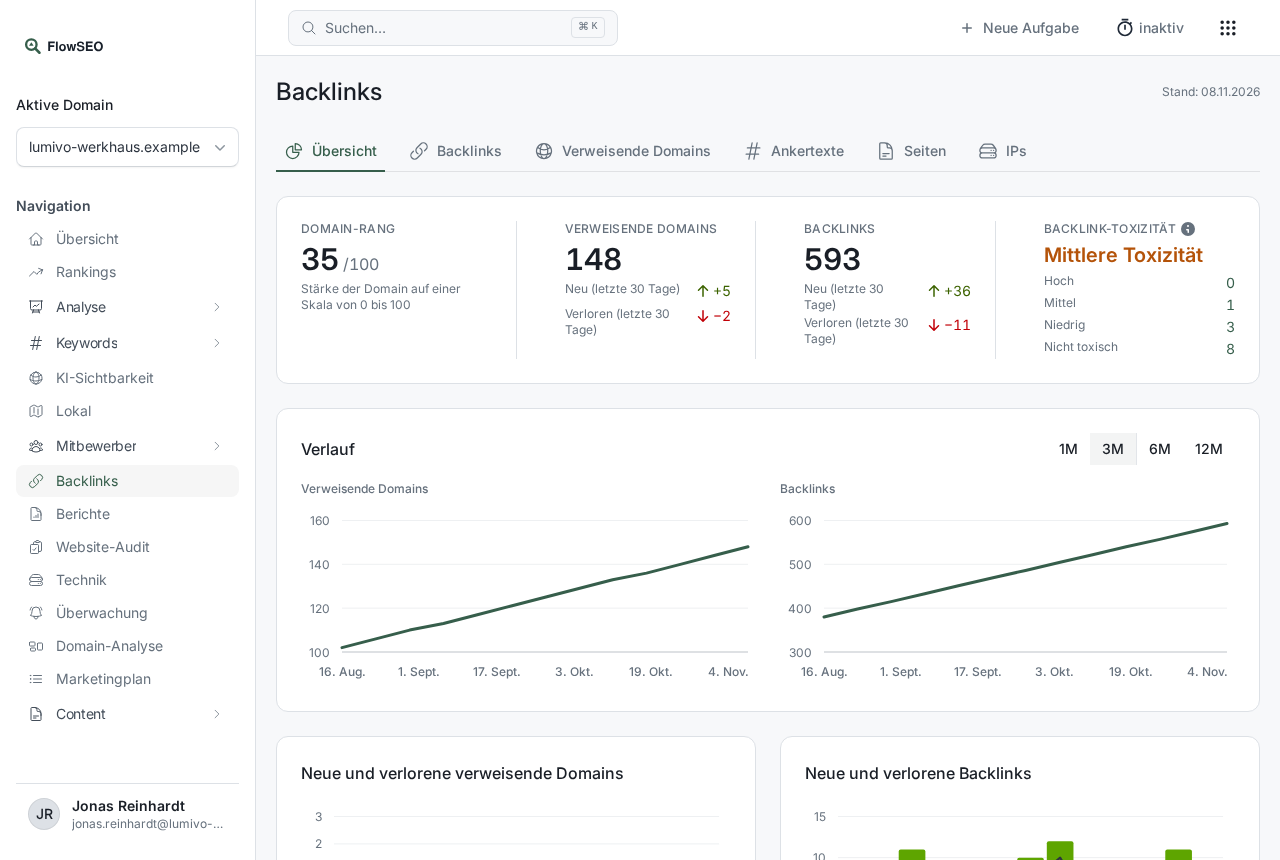
The Overview tab shows the most important numbers:
- Domain rank: the strength of your domain on a scale of 0 to 100.
- Referring domains: how many different websites link to you, with new and lost domains over the last 30 days.
- Backlinks: all links to your domain, also with new and lost.
- Backlink toxicity: how many links look suspicious. Click a number to open the backlinks in question.
Below that you'll find the History (1M, 3M, 6M, 12M), new and lost links per week, the top anchor texts, the domains by domain rank and the countries. The other five tabs are covered in Backlink lists in detail.
What to do with the numbers
- If an important link disappears, a quick message to the site owner is often worthwhile.
- Putting suspicious links in context: A few weak links are normal. Identifying toxic backlinks explains when it's worth acting.
Reading domain analysis
Open Domain analysis in the sidebar.
- Organic keywords: how many keywords your domain ranks for in the top 100.
- Estimated visits: a monthly projection based on position and search volume.
- Traffic value: what the same visits would cost through Google Ads, in US dollars.
- Paid keywords: keywords your domain runs ads for.
The change under each number compares against the previous report, and the month is shown next to it.
Position distribution shows how many keywords sit in each range, and Show values as a table gives you the exact numbers. Top keywords lists up to 500 keywords, selected by estimated visits, with position, search volume and ranking URL. Comparison with competitors puts your domain next to the competitors on file.
Domain analysis is most useful for discovery: keywords you're already found for can go on your keyword list, so FlowSEO measures them precisely from then on.
Good to know
- No report yet: The first fetch starts automatically, usually the morning after your domain is set up.
- Estimates, not measurements: Domain analysis figures are projections from a data provider. For exact positions, go by your rankings. For real clicks, go by Google Search Console.