
Below its tables, the Rankings page has a ready-made analysis of the selected period. It tells you how many keywords went up, which pages rank best and where you stand compared to your competitors. How to read the tiles and tables at the top is explained in Reading and filtering rankings and viewing the position history.
All blocks follow the search engine and the period selected at the top of the page (30 days, 3 months, 6 months or 1 year). FlowSEO remembers your selection.
Distribution of positions
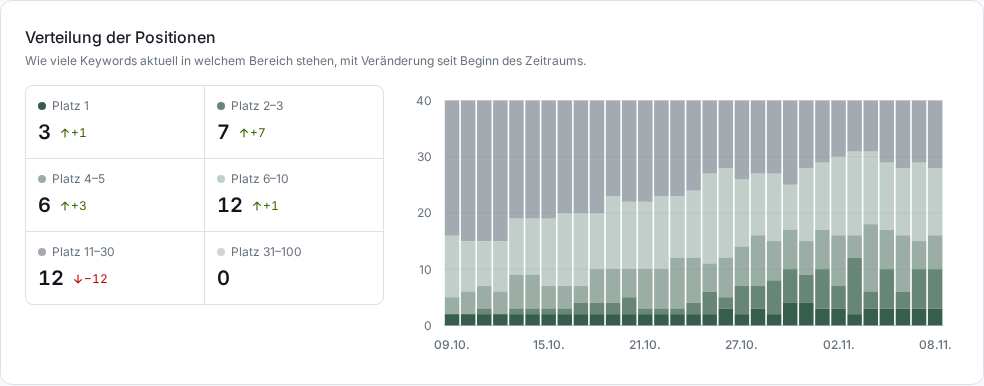
Distribution of positions shows how many keywords currently sit in each range: Position 1, Positions 2–3, Positions 4–5, Positions 6–10, Positions 11–30, Positions 31–100 and Not in the top 100, each with the change since the start of the period.
Up and down
Up and down compares each keyword with its position at the start of the period, split by current position. This shows you whether the gains happened on page 1 or further back.
If you see “A comparison needs a measurement at the start of the period.”, choose a shorter period or wait for the next measurements.
Keywords at a glance
Best positions, Improved and Declined are three short lists and the fastest way to the keywords that need attention right now.
Pages
Pages turns the view around: you see the pages of your website in the search results and how many keywords rank on each of them, with the tabs Top, Improved and Declined. A page with many keywords on page 2 is often the best candidate for a revision.
Competitors
The table shows the Top 10 keywords and the Visibility for your keywords per Domain, each with the change since the start of the period. In the Competitor distribution chart:
- The further right, the more keywords are in the top 10.
- The further up, the better the average position.
- The larger the bubble, the higher the visibility.
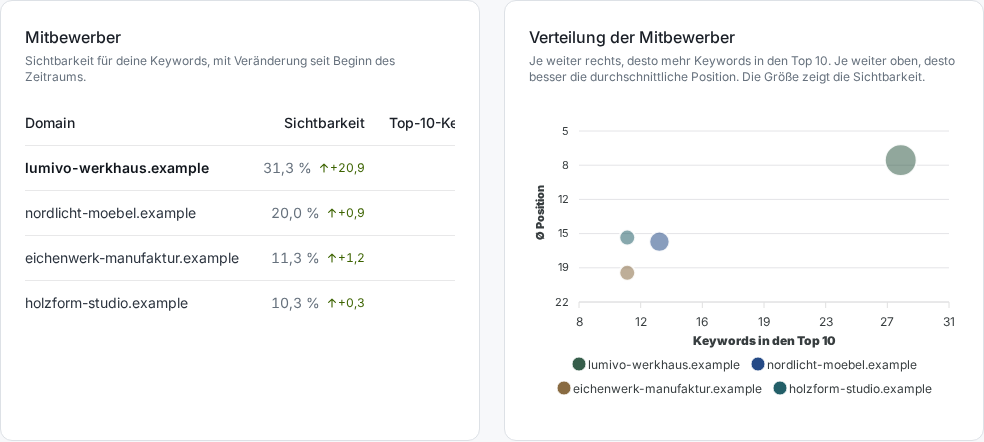
Whoever sits at the top right with a large bubble is your strongest competitor for your keywords. More in Comparing competitors.
The signs in the tables
- Entered the top 10: the keyword made it to page 1 during the period.
- Left the top 10: the keyword dropped off page 1.
- Value not confirmed yet: the last measurement didn't find your domain, but its absence isn't confirmed. More in Rankings FAQ.
Good to know
- The analysis loads separately. With large keyword sets you briefly see “Loading analysis”.
- Without measurements for competitors in the period, the block stays empty. You add a missing competitor in the browser or through your AI agent.