
You don't need everything everywhere: maybe Bing doesn't matter in Austria, or only mobile search counts for a certain country. You can turn off these parts yourself without removing the whole location. How to add or remove a location is covered in Adding and removing locations.
Turn off a measurement
Under Management, open Locations. Each card stands for a country with a language and shows what is set up and active, for example “4 search engines, 6 AI platforms” and “8 of 10 active”.
- Click Edit on the card.
- In the Edit location window, each measurement has its own switch under Search engines and AI platforms.
- Turn off what you don't need and click Save.
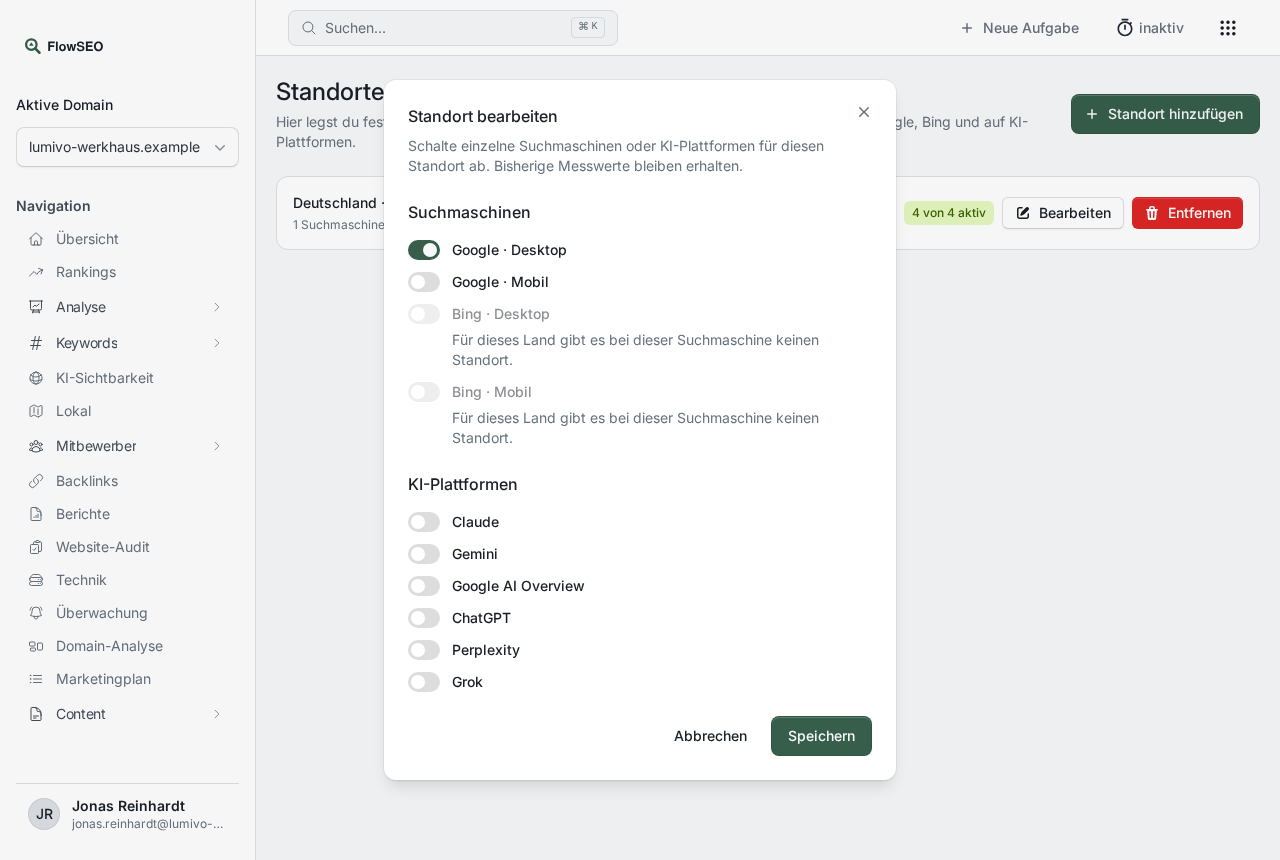
Parts you turn off are no longer measured from that point on. Switches that aren't available stay greyed out: Paused by the operator, or if the search engine has no location for that country.
What happens to your existing values
When you turn something off, all measurements stay saved, there are just no new ones. As long as a part is off, it isn't available for selection in Rankings and AI visibility. If you turn it back on, it returns with its history.
That's the difference from Remove: there, measurements without history are deleted and measurements with history are paused.
Typical cases
- Bing doesn't matter: Turn off Bing Desktop and Bing Mobile for that country, Google stays.
- Only mobile search counts: Turn off the desktop measurements.
- An AI platform doesn't give useful answers in the local language: Turn off that platform for that country.
Good to know
- You maintain the questions for your AI visibility in the browser or through your AI agent. The switches only decide which platforms and which country they are asked on.
- You can't change an interval or individual configurations with these switches, our team sets those.