
Whether you can already book FlowSEO yourself is shown on the pricing page: if it says “Not available to book yet”, that isn't possible yet.
Who can book
Only the owner of the team can book or change plans. If you don't have that right, the page tells you so. You can also only book as a business within the meaning of section 14 of the German Civil Code.
How to book
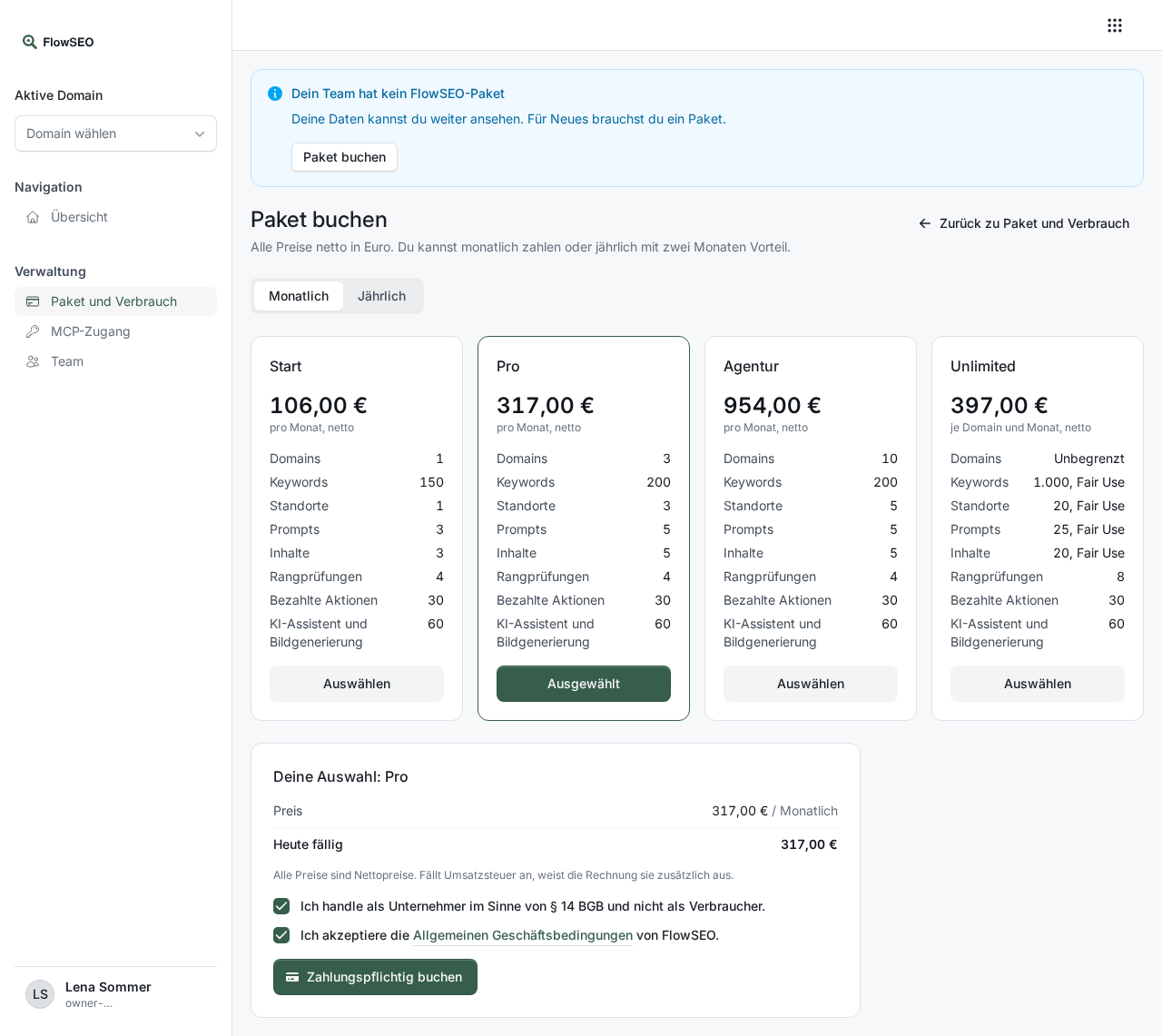
- In FlowSEO, open Plan and usage on the left and click Book a plan. From the pricing page, Choose package takes you straight there after you sign in.
- Choose Monthly or Yearly, then the package. With yearly payment, the year costs as much as ten months.
- Confirm that you act as a business and accept the General Terms and Conditions.
- Click Book with obligation to pay. You are forwarded to the payment. How to pay is described in Invoices and payment.
The package applies once the payment has arrived. Until then, Plan and usage shows that your booking is waiting for payment, and you can pay again from there.
What is included
All prices are net prices. How many domains, keywords, prompts and pieces of content a package covers is on the pricing page. How they are counted is explained in Limits and fair use.
Managed
Support by our team is still available on request. We then set up the package and surcharge for you, and you don't need to book anything here. Managed is billed monthly; yearly billing is only available when you book yourself. Managed has a minimum term of 6 months, see Change or cancel your package.