
Once your SEO calendar is set up, the AI writes your posts 30 days in advance. Nothing goes out without approval. This is where you approve posts, change what doesn't suit you or schedule a topic of your own.
Reading the calendar
Open Content and then SEO calendar. You'll see the current month with one card per date. Use Today and the arrows to change the month.
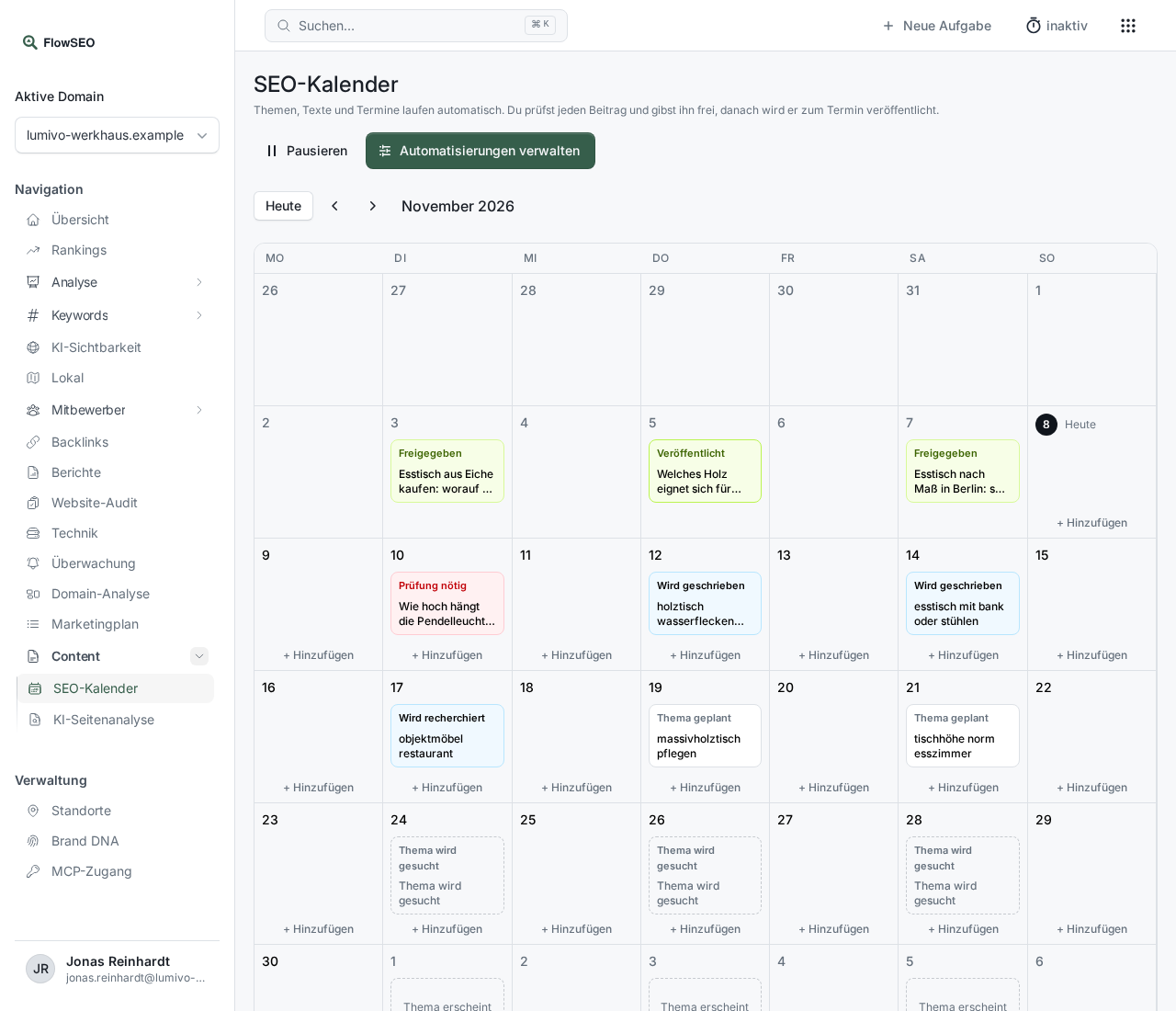
Each card shows where the post stands:
- Finding a topic: A topic is being found for this date.
- Topic scheduled: The topic is set and the text will follow soon.
- Researching and Writing: The AI is analysing the search results and writing.
- Review needed: The post is finished and waiting for you.
- Overdue: The date has passed without the post being approved. Nothing goes out.
- Approved: The post will appear on its date.
- Published: The post has been delivered.
- Error: Something went wrong while it was being created.
- Work starts on …: The date is more than 30 days away. Work on this post starts on the day shown.
Approving a post
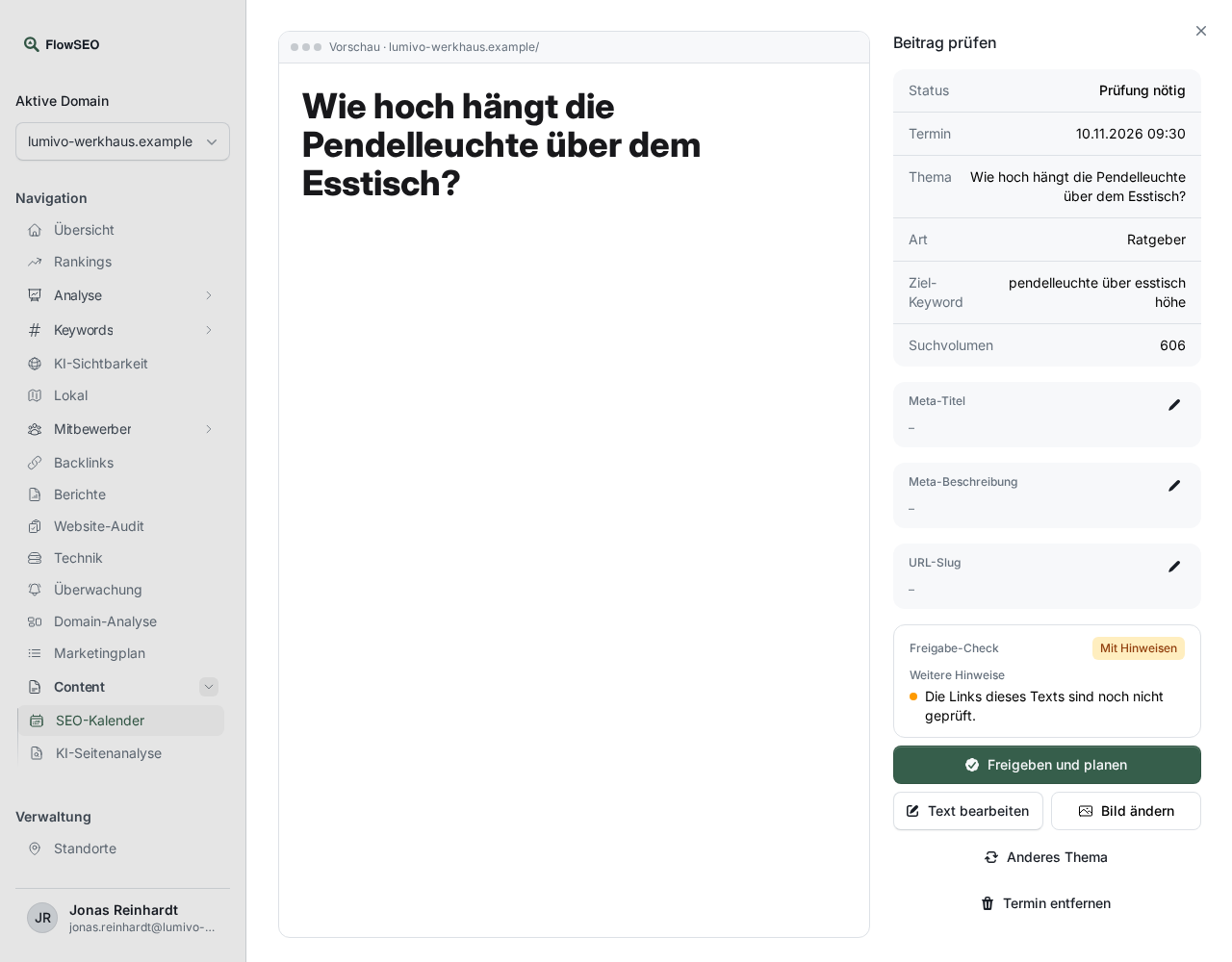
- Click a card marked Review needed. Review post opens on the right.
- Read the text in the Preview. Next to it you'll see Date, Topic, Type, Target keyword and Search volume.
- Check the Meta title, Meta description and URL slug. The pencil next to each one lets you change it directly.
- If the automatic fact check has found statements that contradict the sources or aren't supported by them, confirm each one individually with Seen, release anyway.
- Click Approve and schedule. The post goes out on its date through the selected connection. If none is connected, your team gets it by email.
If something isn't right
As long as the post hasn't been approved, you have these options:
- Revise with AI: Write what should change, for example “Shorten the introduction to two sentences.” Undo takes a change back as long as the text hasn't been edited further since.
- Edit text opens the editor with the text and meta details.
- Change image replaces the main image with one of your own.
- Different topic discards the topic. It won't be suggested again, and the date automatically gets a new topic.
- Remove date takes the post out of the calendar. The date stays empty and the topic won't be suggested again either.
- If a post shows Error, restart its creation with Try again.
Scheduling your own topic
On today's date or a future one, click Add. In the Schedule your own topic dialog, enter a Search term, for example dining tables for small rooms, and click Schedule. A post is created at your usual time on that day, and you approve it like any other.
Good to know
- Overdue posts: If you approve a post after its date, FlowSEO asks for a new time under Publish on. If you leave the field empty, it's published immediately.
- Taking back an approval: There's no button for this, either in the browser or for an agent. Only our team can cancel the date itself. So check the post before you click Approve and schedule. If it's revised after that, the approval is lifted and it won't go out without a new approval, see the next point.
- Changes after approval: If an approved post is revised, with Revise with AI or by an agent, it goes back to Review needed. The date stays in place, but the post is only published if you approve it again first.
- Failed publication: The review window names the reason. If the address is already taken, an image is too large or an image is missing from the media library, the post returns to review by itself and the approval is lifted. Approve it again once you've made the change. The steps are in WordPress publishing isn't working.
- Release through an AI agent: A connected agent can release posts. With the switch off, it's instructed to ask you first. That is only the agent's own statement and not a technical lock. The details are in The “Let AI agents release on their own” switch.
- Refresh: Cards with this label aren't new posts. An existing page that ranks well but is rarely clicked gets reviewed and extended. After approval, your team receives the text by email so they can update the page.
- Better topics: Topics come from your keywords, research, Search Console and the comparison with your competitors. If they don't fit, sharpen your Brand DNA or raise the Minimum search volume.